

What blueprints are
If you build more than one site, you probably start each one the same way: the same theme, the same plugins, the same pages and settings. A blueprint saves a finished website as a starting point, so every new website can start from it instead of from scratch.
- Included on every plan. An account can keep up to 5 blueprints; they count toward its disk space.
- Saving a blueprint does not change the website it is made from.
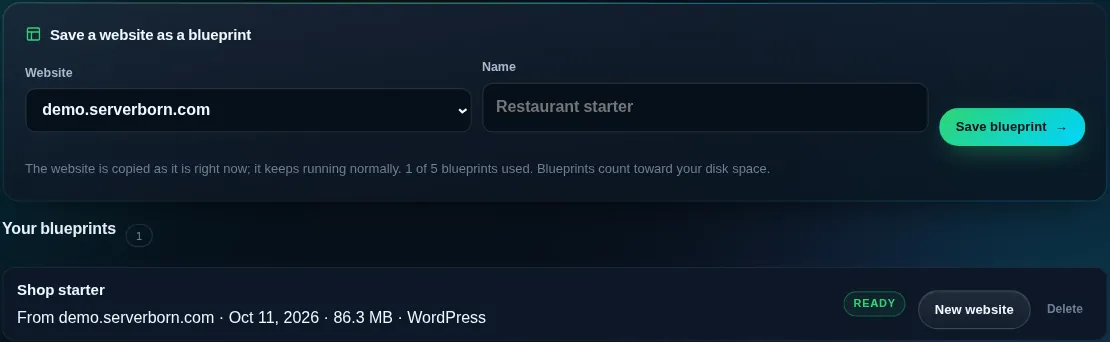
Save a blueprint
- Open Blueprints
Sidebar → Blueprints, or the Save as blueprint tile on a website's Manage page.
- Choose the website and a name
Pick the website to copy and give the blueprint a name you will recognize, like
Restaurant starter. - Save
The website is copied as it is right now, usually in under a minute. It keeps running normally.
Start a website from a blueprint
- Add a website
On the dashboard press Add website (or New website next to the blueprint).
- Choose the blueprint under Start from
Enter the new website's address as usual and pick the blueprint instead of An empty website. The new website is ready in a minute or two.
What is copied
Every file (theme, plugins, uploads) and, for WordPress, the whole database: pages, posts, menus, settings and users, so you sign in with the same username and password. The new website gets its own address, its own security keys and, when the original hides its login page, its own new hidden login address.
Analytics, statistics, redirects and backups are not copied; they start fresh for the new website. A website made from a blueprint uses one of your plan's website slots, like any other.
Does changing a blueprint change websites made from it?
No. Each website made from a blueprint is its own independent copy. To update a blueprint, save it again from the website you keep as the template and delete the old one.
Can I use a blueprint on another hosting account?
Blueprints belong to the hosting account they were saved on. Open a ticket if you need one on another account.
Is a blueprint the same as a backup?
No. Backups are taken every night to restore a site; a blueprint is a starting point for new websites.