

Database tools sit on each website's Manage page (the Database tools tile, or Database tools in the sidebar). Both tools show a preview first, save the database right before any change, and can be undone in one click.
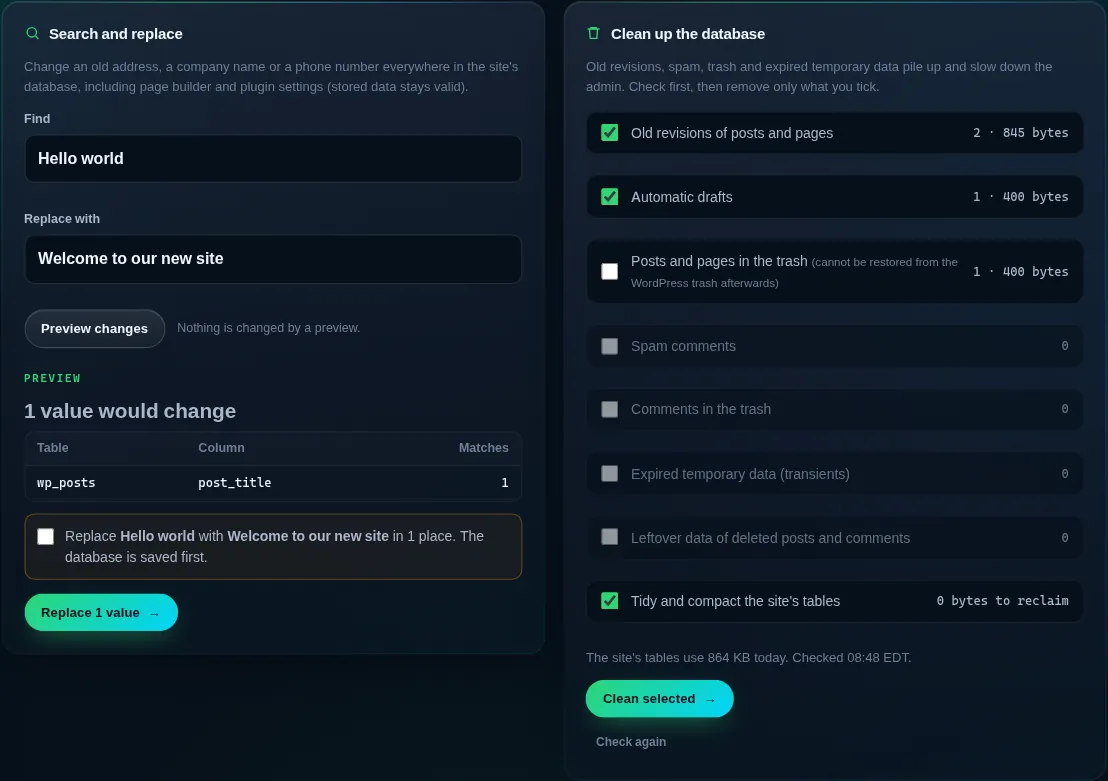
Search and replace
Change an old address, a company name or a phone number everywhere in the site's database, including page builder and plugin settings. Stored data stays valid, which a plain database edit would break.
- Enter what to find and the replacement
For example
http://old-domain.comandhttps://new-domain.com. - Press Preview changes
Nothing is changed yet. The preview lists every table and column with matches and the total number of values that would change.
- Confirm and replace
Tick the confirmation and press Replace. The database is saved first and the site's caches are cleared afterwards.
A preview is valid for one hour. Searches are exact text matches, upper and lower case included.
Clean up the database
WordPress keeps every revision of every post, automatic drafts, spam, trash and temporary data. Over time that slows down the admin. Check what can be cleaned counts each kind and the space it uses; you tick what to remove and press Clean selected.
- Old revisions, automatic drafts, spam and trashed comments, expired temporary data and leftover data of deleted posts.
- Posts and pages in the trash are not ticked by default: once cleaned, they can not be restored from the WordPress trash.
- Tidy and compact reclaims space the database keeps after deletes.
Undo a change
After a search and replace or a cleanup, the page shows Undo this change. It puts the website's database back exactly as it was right before. Only the newest change to a website can be undone, the same rule as staging pushes and safe updates.
Undo puts back the whole database of that website, so orders, comments or form entries that arrived after the change are lost. Check the site soon after a change.
Do these tools work for sites that are not WordPress?
They work on WordPress databases. For other databases, use phpMyAdmin from the Databases page.
Can a search and replace touch another website's data?
No. It only changes the tables of the website it runs on, even when several websites share the account's database.
How much space does a cleanup free?
The check shows an estimate for each item, and after cleaning the page shows the size of the site's tables before and after.