

What redirects do
When a page moves or is renamed, the old address still gets visitors from bookmarks, other websites and search engines. A redirect sends them to the new page instead of a "page not found". A permanent (301) redirect also tells search engines to move the old page's ranking to the new one.
- Included on every plan, for every website and staging copy, WordPress or not.
- Your server answers before WordPress loads, so redirects are instant and need no plugin.
- The edge cache is cleared after every change, so visitors see it within seconds.
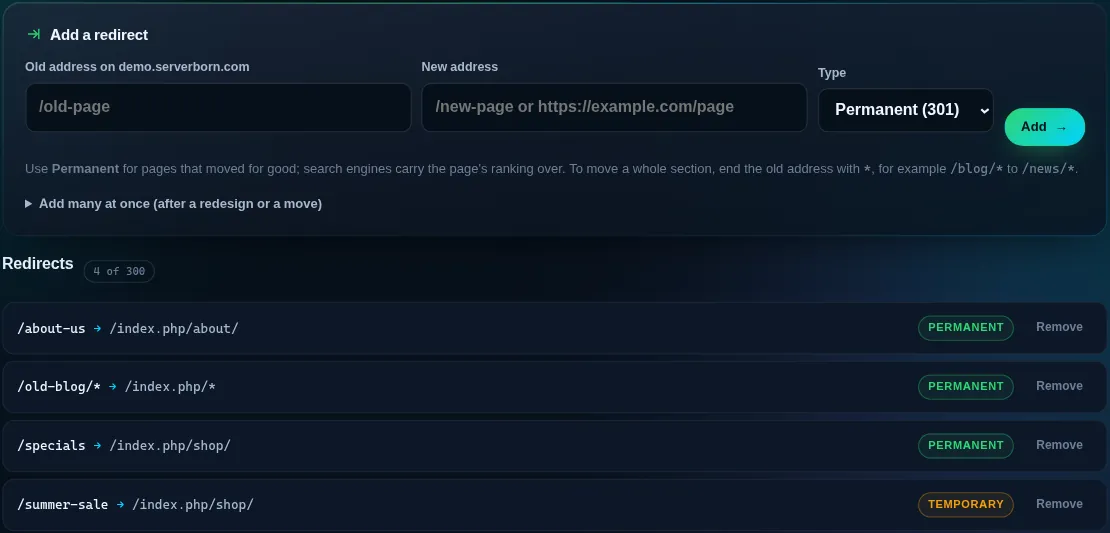
Add a redirect
- Open the website
Dashboard → Manage on the site, then the Redirects tile (or Redirects in the sidebar under This website).
- Enter the old and new address
The old address is a path on your site, like
/old-page. The new address is a path on the same site or a full address likehttps://example.com/page. - Choose the type and add
Permanent for pages that moved for good, Temporary for a short promotion or maintenance. Press Add; it is live in a few seconds.
To move a whole section, end both addresses with *: /blog/* to /news/* sends /blog/hello to /news/hello. Query strings like ?ref=1 are kept.
Add many at once
After a redesign or a move from another host, open Add many at once and paste one redirect per line: the old address, a space, the new address. Lines that can not be used are listed with the reason, the rest are added. A website can have up to 300 redirects.
What can and can not be redirected
Addresses that WordPress and the server need are protected, so a typo can never lock you out: /wp-admin, /wp-login.php, /wp-content, /wp-includes, /wp-json, /xmlrpc.php and your hidden login address. Addresses with spaces or % signs are not accepted; use the plain version of the address.
Do redirects work on sites that are not WordPress?
Yes. They work on any website on ServerBorn, static or PHP, because the server handles them before any site code runs.
Will a redirect hurt my search ranking?
A permanent redirect is the recommended way to move a page: search engines carry the page's ranking over to the new address.
How do I remove a redirect?
Press Remove next to it on the Redirects page. The old address answers normally again within seconds.
Can I use a WordPress redirect plugin instead?
You can, but panel redirects are faster: they answer before WordPress loads, and they keep working even if a plugin is turned off.