

How ServerBorn analytics works
Analytics shows who visits your websites: visitors, pageviews, which pages they read, where they came from, their country and device. It is built to respect your visitors:
- No cookies and nothing stored on the visitor's device, so you don't need a cookie banner for it.
- No IP addresses or browser fingerprints are stored. A visitor is counted with an anonymous ID that is rebuilt from a random key every day and then thrown away, so nobody can be followed across days or identified.
- Your data stays with us. Nothing is sent to Google or any other third party.
- Accurate. Most of your pages are served straight from the Cloudflare cache for speed, which means server logs never see those visits. The analytics script runs in the visitor's browser, so cached visits are counted too.
- Tiny. The script is about 2 KB and loads from your own domain after the page is shown, so it doesn't slow your site down.
This is not legal advice, but because no personal data or cookies are involved, privacy laws like GDPR generally don't require consent for this kind of analytics. Mention it in your privacy policy to be transparent.
Turn analytics on
- Open Analytics
Sidebar → Analytics, or the Analytics link on any website card. Press
/and type “analytics”. - Pick the website
If you host several websites, choose one from the pills at the top. Each website has its own stats.
- Click Turn on analytics
Tick Also count visits from logged-in WordPress editors and admins only if you want your own browsing included.
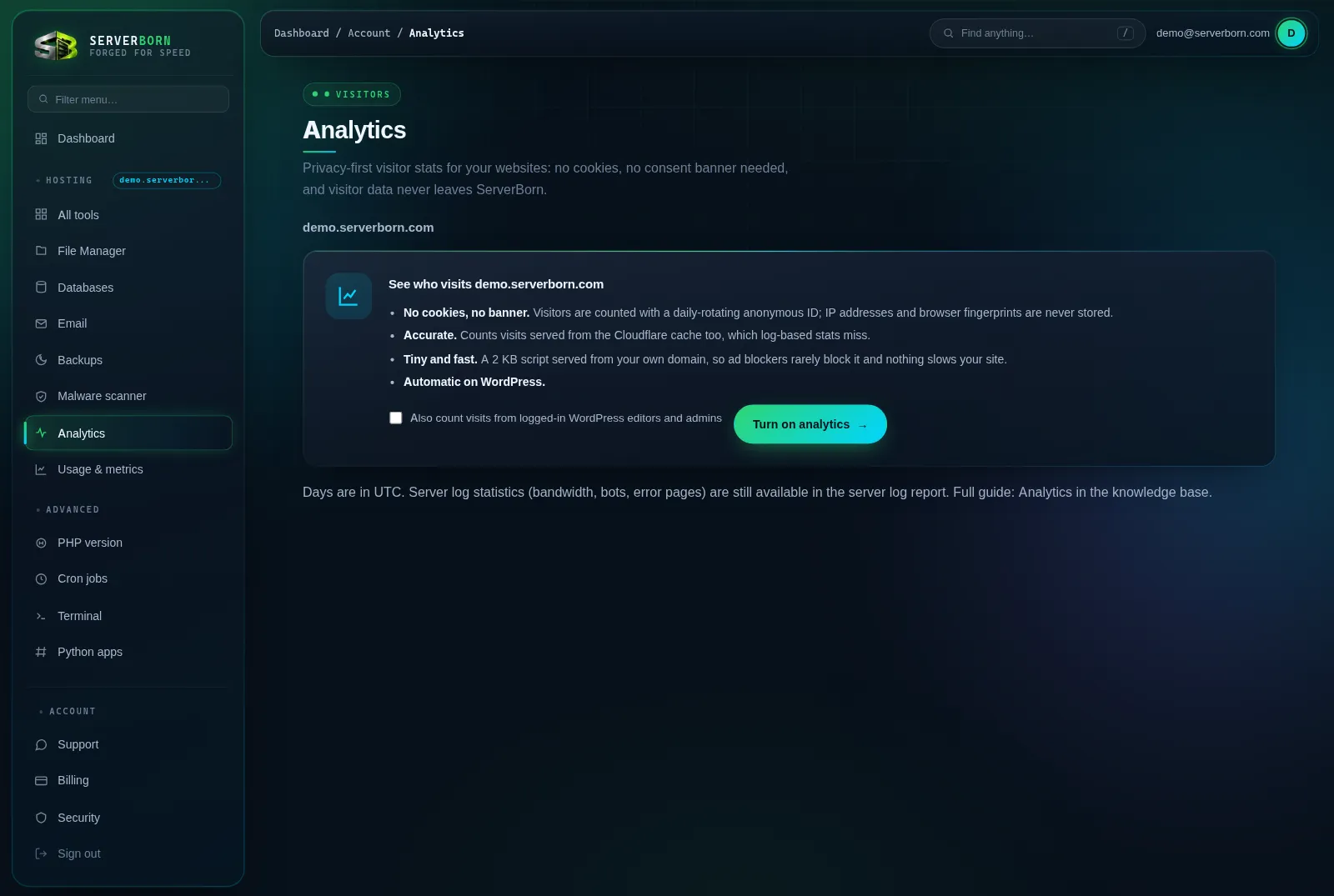
On WordPress that's all: the script is added to every page automatically, and the cached copies of your pages are refreshed so it shows up right away. Visits start appearing within a couple of minutes.
Static and custom sites
For sites that aren't WordPress, paste one line into the <head> of every page you want counted, just before </head>. The exact line, with a Copy button, is under Settings on the Analytics page. It looks like this:
<script defer src="/_sb/s.js"></script>
Single-page apps (React, Vue and similar) are supported: when the page address changes, a new pageview is counted automatically.
Turning analytics on adds a small folder called _sb to your website (you'll see it in the File Manager). It holds the script and the collector. Please don't edit or delete it; turning analytics off removes it for you.
Read the dashboard
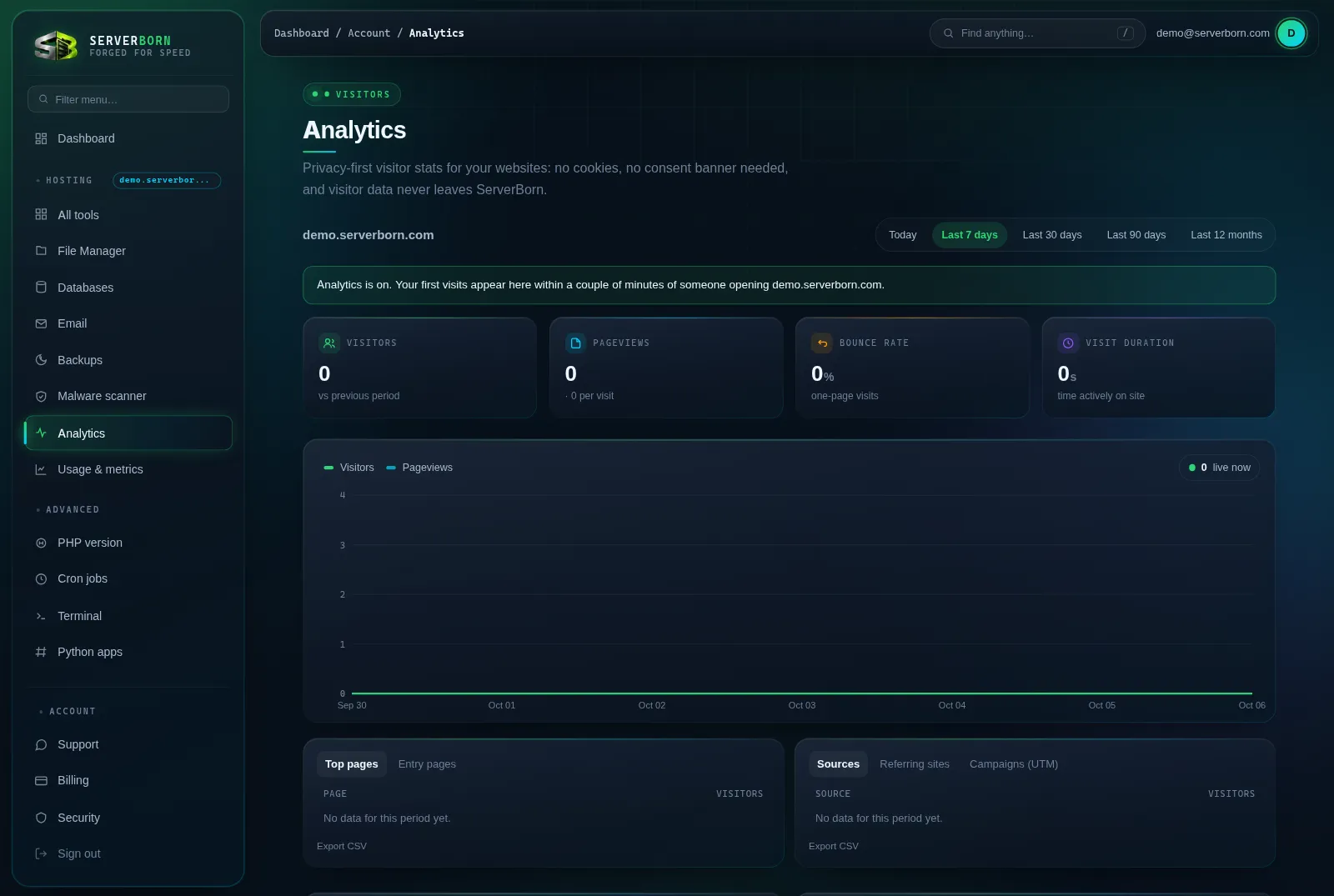
- Visitors: unique visitors per day, added up over the period you picked.
- Pageviews: every page loaded, plus how many pages an average visit includes.
- Bounce rate: the share of visits that viewed only one page.
- Visit duration: how long people actively had your site in front of them (time in a background tab doesn't count).
- The small percentage under each number compares with the previous period of the same length.
- Live now: visitors active in the last five minutes. It refreshes every minute.
Choose Today for an hour-by-hour chart, or 7 days, 30 days, 90 days and 12 months. Hover the chart to see exact numbers.
Below the chart, four cards break your traffic down. Use the tabs on each card:
- Top pages and Entry pages (the first page of each visit).
- Sources (Google, Facebook, ChatGPT, newsletters and so on), the exact Referring sites, and Campaigns from UTM tags.
- Countries, worked out by Cloudflare from the connection; the IP address itself is never stored.
- Devices, Browsers and Operating systems.
Tag the links you share with ?utm_source=newsletter&utm_campaign=october and they show up under Sources and Campaigns, so you can see which post or email actually brought people in.
Site speed for real visitors
With analytics on, the same small script also measures how fast each page felt to the visitor, using the browser's own timing (Core Web Vitals). The Site speed for real visitors section of the Analytics page shows the result.
- Loading (LCP): when the main content appeared. Good is 2.5 s or less.
- Responsiveness (INP): how quickly the page reacted to clicks and taps. Good is 200 ms or less.
- Visual stability (CLS): how much the page jumped around while loading. Good is 0.1 or less.
Each number is the 75th percentile: three out of four visits were at least that fast, the same way Google judges a site. Switch between all visitors, phones and computers, see the trend by day and the slowest pages. A score needs at least five visits in the chosen range.
If a site gets clearly slower for real visitors (the last three days against the two weeks before, with enough visits to be sure), we email you, at most once a week per site. A new plugin, a large image or a new script are the usual causes; Safe updates and staging are good places to test a fix.
Exclude your own visits
Logged-in WordPress editors and admins are already left out unless you chose to count them. To leave out a browser entirely (your phone, a work laptop), open the link shown under Exclude your own visits on the Analytics page once in that browser. It looks like https://yoursite.com/?sb_ignore=1.
That stores a small flag in that browser only. To be counted again, open the same link with sb_ignore=0.
Settings, export and deleting data
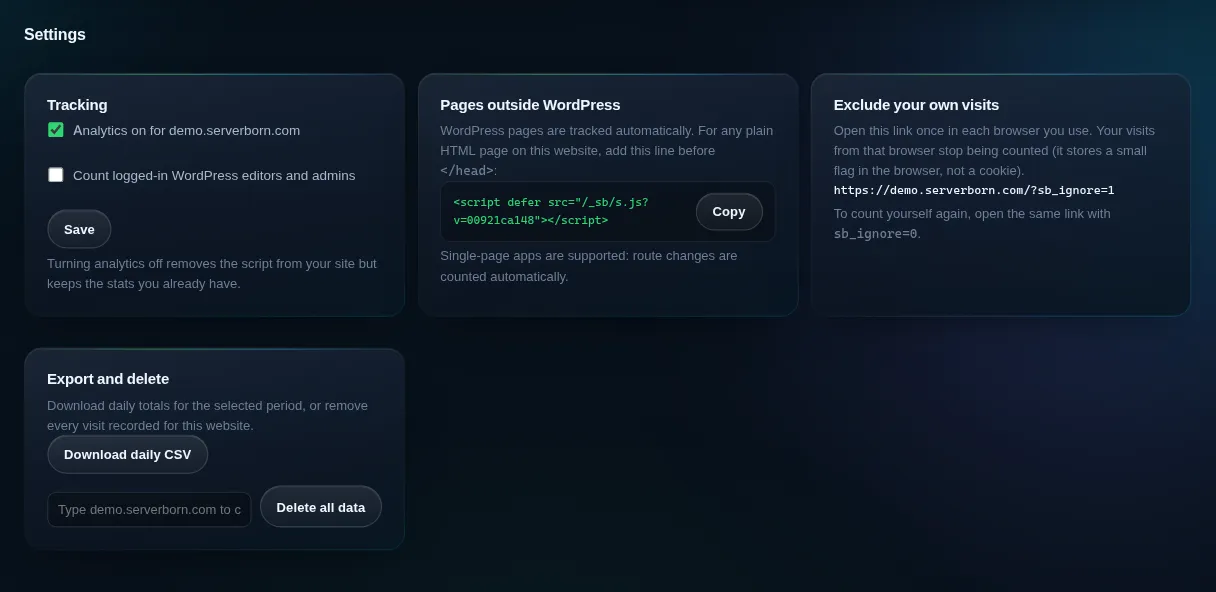
- Turn analytics off: untick it and save. The script is removed from your site; the stats you already have are kept.
- Export: Download daily CSV gives one row per day for the selected period. Every breakdown card also has its own Export CSV link.
- Delete all data: type the website's domain to confirm, and every visit recorded for it is erased. This cannot be undone.
How long data is kept
Detailed visit records are kept for about a week, which is what powers the Today view and live visitors. After that they are combined into daily totals, which are kept for two years. Days follow Eastern Time.
Speed readings are kept for 35 days; their daily summaries (the trend) are kept for about 13 months.
The older server log report (bandwidth, bots, error pages) is still available from the link at the bottom of the Analytics page and on the Usage page.
Questions
Why don't my numbers match Google Analytics?
Different tools count differently. We don't use cookies, so a person who visits on Monday and again on Tuesday counts as a visitor on each day. Ad blockers block Google far more often than a script served from your own domain, and bots are filtered out. Expect our visitor numbers to be honest, not identical.
Do I need a cookie banner?
Not for ServerBorn analytics: it sets no cookies and stores no personal data. Other tools on your site (ads, embedded videos, other trackers) may still need one.
Will ad blockers block it?
Rarely. The script loads from your own domain and isn't on the common block lists, but no tool can promise to count every single visitor.
Does it slow down my site?
No. The script is about 2 KB, loads after your page is shown, and sends a tiny message in the background.
Are bots counted?
No. Known crawlers, uptime monitors and headless browsers are filtered out, and bots that don't run JavaScript never load the script at all.
Can my visitors opt out?
Yes. Anyone can open your site with ?sb_ignore=1 once, and their browser is no longer counted.
Is analytics included in my plan?
Yes, on every plan, for every website on it.